


- Making risk assessment on firewalls
- ISO27001 audit control
- PCI audit control
- NIST audit control
Effective management: Making policy management in an effective way requires management effectiveness. These are some of the items that are made for this management easiness and effectiveness:
- Having virtualized multi-tenancy features
- Corporate policy management/view/usage
- Rule/object usage monitoring
- Alerting on new problematic rule creation
- Finding out firewall changes
- Having executive dashboards
- Firewall specific network topology view
Known Issues and Limitations
Integration vendors: Opinnate has integration with the leading firewall vendors. Palo Alto, Fortinet, Check Point, Cisco, Sophos, Vmware NSX, (Google, Amazon, Azure with 5.1)
Log collection: All syslog data is collected but just the traffic logs and event logs are investigated, and all traffic logs are stored in a special format for the last 30 days period.
Unused Rules: Unused rules are found based on the Last Used data we collect from firewalls. If there is an issue with this data generation unused rules cannot be identified. A ticket should be opened to the related firewall vendors if this is the case.
Clear text protocol usage on reporting: Clear-text protocol usage for admin access identification cannot be made for Check Point firewalls.
Panorama: If there is Panorama integration for Palo Alto firewalls the integration must be over Panorama.
Getting Started
This product is suggested to be used on a server with the mentioned Operating System and version:
- Ubuntu v20 or higher
- Docker Engine installed
- Docker compose installed
Installation Steps
This is the summary of installation steps for v5.1. for docker based installation. Detailed installation options and steps can be found on the Installation Guide document.
- Docker Engine Installation: A Docker engine is to be installed on the system if not installed.
- Docker Compose Installation: Docker compose is to be installed if not installed.
- Downloading files: A zip file containing all docker image files, compose file and installation script file.
- Running script: Using the script file installation of the system.
Upgrade Process
These are the steps to upgrade for the customers that use 4.2.x release of Opinnate.
1. Before Upgrade
- Take Snapshot for both Manager and Collector components.
- Find out local admin (or default admin) user and password.
- Check the License.
- Check the web connection providing with SSL certificate or not.
- Take a control on Alert Composer.
- Check the Collector and Trusted host.
- Check the Firewall Connection.
- Check the risk score.
2. Manager
- Opinnate will provide v5.1.1 Upgrade File(s).
- Connect Opinnate Web UI via browser with HTTPS protocol.
- There is “System Configuration / Upgrade” menu on “System” on left menu bar.
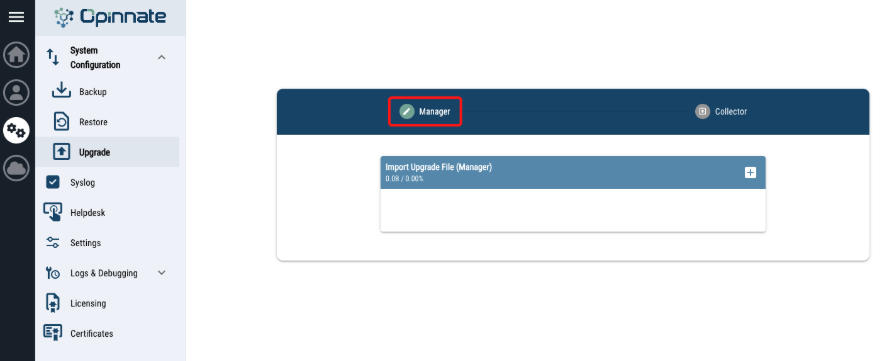
- Select the upgrade zip file and click upgrade.
- Then cloud/upload icon will appear on right/up corner and click on it.
- The system will log you out after each upgrade process.
- While upgrading, services will restart, Services can be controlled with “watch docker ps” command from cli.
3. Collector
- Upgrade files for Opinnate Collector v3.2.1 will be provided.
- Connect Opinnate Web UI via browser with HTTPS protocol.
- There is “System Configuration / Upgrade” menu on “System” on left menu bar.
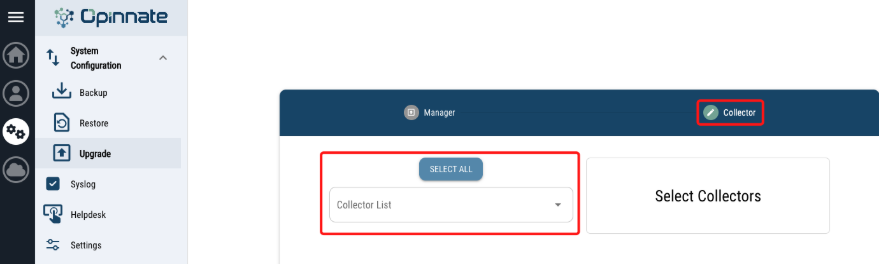
- Select the collector which one or all planned to upgrade.
- Select the upgrade zip file and click upgrade.
- Then cloud/upload icon will appear on right/up corner and click on it.
- While upgrading, services will restart, Services can be controlled with “watch docker ps” command from cli.
4. Steps Required After Upgrade
- Check the remote authentication.
- Insert Coupon Code for trial usage on Add-Ons (Opinnate Support).
- Trigger manually Renew Data process.
- Check the SSL connection from client to Opinnate Manager.
- Check the Alert Composer Alerts if any of them could be triggered.
- Check the SMTP Server connection with sending a test mail.
- Check the connectivity between Manager and Collector.
- Check the existence Unused Address & Unused Address Group Widget in Virtual Area Dashboard.
- Create tasks for newly added Rule Usage types.
- Export Rules Excel & PDF for testing. Export file will be generated in Compliance & Reporting > Export.
- Check the Alerts under Alert & Notification Setting for existence and newly added, then enable Collector alarms if needed.
- Create Debug File for checking.
Updates and Changes
These are the new features added in 5.1.1 version.
Global:
- Opinnate Manager Auto Backup feature is added.
- Opinnate Manager Backup Upload to External server option has been added.
- Collector Upgrade option has been added in Global > System > System Configuration > Upgrade.
- .pfx option has been added in Certificates.
- Traffic Log storage can be edited in Global > System > Settings for Collector (Default 30 Days).
- Login Banner option has been added in Global > System > Settings.
Analysis:
- Unused Addresses & Unused Address Groups widgets are added in Virtual Area Dashboard.
- Added an IPsec VPN page under Firewall Dashboard.
- Reference counts for objects are displayed on the Firewall Dashboard.
- New Rules Filter Fields are added:
- Accepted Explanation: Text Search option has been added in Risky, Permissive Critical and Policy Conflict Acceptance Explanation.
- Source IP Count & Destination IP Count & Total IP Count: IP Count search has been added for source, destination or total.
- Source Type & Destination Type: A search option has been added depending on the address type (IPMASK, IPRANGE, FQDN etc.).
- Master Rule ID: Search shadowed rules by Master Rule ID.
- Schedule:
- Next Days: Following Days from now.
- Days After: After <int> Days.
- Address and address group references are now shown in separate sections: Rules, Address Groups, and NAT.
- Security Policy Check feature has been added: Analysis can be made for Corporate Policy.
- IP resolution support has been added for FQDN objects:
- IP Details are shown in Rule Cards, Addresses, Address Groups for
FQDN Objects.
- User based check option has been added for Rule Check & Rule Check Path Free.
- FQDN Objects and their IP Resolution are included in Rule Check.
- Negate option has been added in Rule Check Analysis.
- Rule Checker now shows deny rules.
- New Rule Usage options have been added:
- Only Source
- Only Destination
- Only Service
- Only User: User Base Analysis has been added from traffic logs.
- Only Application: Application Base Analysis has been added from traffic logs.
- User Base: Results now show “User” instead of “Source”.
- Application Base: Results now show “Application” instead of “Service.
- Enabled running Rule Usage for a rule directly from the Rule Usage Task List on
the rule card.
- Rule/Custom Usage results are now orderable by hit count and additional fields
inside of the task.
- Cloud Firewalls are supported for analysis:
- Microsoft Azure (NSG & Native Firewall)
- Amazon Web Services (AWS – AWS Security Group & Native Firewall)
- Google Cloud Platform (GCP)
Notes: This release supports pulling rules from cloud platforms and running
analysis. Syslog analysis, optimization, and automation are not included in this
version.
- Huawei L3 Switch / Router are supported.
- Increased the Usage Task List limit from 10 to 20 tasks.
- Audit Comment Field: Audit Comments for Fortinet and Palo Alto are now shown in the Custom Real-Time Rule Config Change alert.
- Multiple Collector option has been added: Supporting for multiple Collectors to enable location-based segmentation and load distribution for firewall logs.
- SMTPServer: Moved SMTP Configuration from Alert Notification Settings into a
separate “SMTP Server” menu.
- New Alerts added:
- Collector Service Health Check: Checking connection between Manager and Collector.
- Collector Log Receive Check: Checking Collector receive and process
traffic logs for firewalls.
- NetworkRolesCreation: Added support for assigning Network Roles from firewall interfaces and address groups.
- Security Policy View Option: Added a list view option in addition to the matrix
view for Security Policy.
Reporting:
- Rule &Object Export no longer triggers a direct download. Exports are now
created in Compliance & Reporting > Export.
- CIS & NCA Report Template has been added in New Report.
Automation
- FQDN Based Rule Create & Update option has been added: FQDN can be used in source or destination also can be used with IP Type.
- Server Cloning architecture has been changed:
- Improved analysis performance.
- Added consolidation suggestions when an existing rule is detected
during rule creation.
- Zone based rule create option has been added to the new release for ease. If you don’t want to create rules with multiple interfaces/zones, disable ‘Multiple Interface’ under Device Settings. This allows rule creation in zone based format instead of interface.
Add-ons:
Application Visibility :
- Application: Applications can be defined with the following details:
- Whether it is behind a load balancer.
- Whether it provides a specific service.
- Which IPs it includes.
- Tagging information.
- Application Map
- Application Map visualizes connections between configured applications and
unclassified IPs (labeled “Other”) in both Map and List views.
- Application connections are now analyzed using traffic logs collected by the
Collector.
- Can be triggered on weekly basis for all applications, or run manually for a
specific application.
- When triggered for all applications, the analysis processes the last 1 week of
traffic log data and generates the results.
- When run manually for a specific application, you can analyze traffic logs
according to the number of days defined in Log Storage.
Certificate Tracker :
- Certificate expiration is monitored.
- Certificates can be uploaded directly to Opinnate Manager, or certificate details
can be entered manually to track the expiration date.
- Notifications can be configured for three dates prior to expiration.
- Supports certificates with .pem, .cer, .der, and .pfx extensions.
- Certificate type must be selected (Certificate / Certificate Authorities) during import.
FW Backup Tracker :
- Added daily/weekly backup support for FortiGate and Palo Alto.
- Backup destination (Manager/Collector/External) and SFTP credentials are
required.
License Tracker :
- Provides license expiration tracking for FortiGate and Palo Alto firewalls and
their managers.
- License information retrieved from the device is presented as options, and the
license type to be tracked can be selected.
- Notifications can be configured for three dates prior to expiration.
Support
If you encounter any issues while using Opinnate NSPM, please contact our support team at [email protected].
Thank you for choosing Opinnate! We hope you enjoy using it.


