


Network Security Policy Manager v5.2
Release Notes
Manager v5.2.1 | Collector v4.1.2
| Opinnate Network Security Policy Manager 5.2 Release Notes | ||
| Doc #39 | Version: 01 | Page 2 / 8 |
Welcome 5.2 release of Opinnate Network Security Policy Manager. This software is designed to make network security policy management to be done effectively and easily. In this document you will find what Opinnate NSPM is, what key features, new features and known issues are.
Opinnate NSPM is a network security policy management solution that tackles firewall rule analysis, hardening, reporting and automation needs in an easy manner. Opinnate makes policy management in different editions. The editions are Lite, Standard and Enterprise. Lite edition is for firewall rule analysis and monitoring; Standard edition also includes optimization features and finally Enterprise edition has all the features including automation.
The product is licensed in subscription model and licensed based on the number of firewall systems used including virtual firewalls and related edition.
Starting with this release there will be also add-on features that can be added to any edition used.
Key Features
Analysis of policies on firewalls: Firewall rule analysis of all firewalls on several different conditions. Some of the items for this analysis includes:
• Viewing all policies from a single console
• Viewing all IP objects
• Rule or path existence control
• Finding out unused rules
• Finding out expired rules
• Finding out disabled rules
• Finding out shadowed rules
• Finding out permissive rules
• Finding out rules not compliant to corporate policy
Rule hardening by cleaning and disabling of rules: This is also called optimization of rules. These are some of the items that is done for optimization:
• Disabling unused rules
• Disabling expired rules
• Cleaning disabled rules
• Disabling shadowed rules
• Disabling duplicated rules
• Removing duplicate objects
• Consolidating redundant rules
Making policy changes automatically: Automation of rule creation activity is an important aspect and need for policy management. These are some of the items that is done by this automation:
• IP based Rule Creation
• User, Application Based Rule Creation
• IP Access Cloning
• Object name/IP change
• Rule update/disable/enable
| Opinnate Network Security Policy Manager 5.2 Release Notes | ||
| Doc #39 | Version: 01 | Page 3 / 8 |
• Comment update on rules
Keeping firewalls compliant to standards: Firewalls are one of the most important control points for several regulations and standards. Firewalls must be kept compliant with these standards. Here are a couple of things that is handled for this task:
• Making risk assessment on firewalls
• ISO27001 audit control
• PCI audit control
• NIST audit control
Effective management: Making policy management in an effective way requires management effectiveness. These are some of the items that are made for this management easiness and effectiveness:
• Having virtualized multi-tenancy features
• Corporate policy management/view/usage
• Rule/object usage monitoring
• Alerting on new problematic rule creation
• Finding out firewall changes
• Having executive dashboards
• Firewall specific network topology view
Known Issues and Limitations
Integration vendors: Opinnate has integration with the leading firewall vendors. Palo Alto, Fortinet, Check Point, Cisco, Sophos, Vmware NSX, Juniper SRX, Google, Amazon, Azure Log collection: All syslog data is collected but just the traffic logs and event logs are investigated, and all traffic logs are stored in a special format for the last 30 days period. Unused Rules: Unused rules are found based on the Last Used data we collect from firewalls. If there is an issue with this data generation unused rules cannot be identified. A ticket should be opened to the related firewall vendors if this is the case. Clear text protocol usage on reporting: Clear-text protocol usage for admin access identification cannot be made for Check Point firewalls.
Panorama: If there is Panorama integration for Palo Alto firewalls the integration must be over Panorama.
Getting Started
This product is suggested to be used on a server with the mentioned Operating System and version:
• Ubuntu v22 or higher
• Docker Engine installed
• Docker compose installed
| Opinnate Network Security Policy Manager 5.2 Release Notes | ||
| Doc #39 | Version: 01 | Page 4 / 8 |
Installation Steps
This is the summary of installation steps for v5.2. for docker based installation. Detailed installation options and steps can be found on the Installation Guide document.
1. Docker Engine Installation: A Docker engine is to be installed on the system if not installed.
2. Docker Compose Installation: Docker compose is to be installed if not installed. 3. Downloading files: A zip file containing all docker image files, compose file and installation script file.
4. Running script: Using the script file installation of the system.
Upgrade Process
These are the steps to upgrade for the customers that use 5.1.x release of Opinnate. 1. Before Upgrade
The following items should be checked and recorded before starting the upgrade of Opinnate Manager and Collector(s).
1. Take Snapshot for both Manager and Collector(s).
2. Find out local admin (or default admin) user and password.
3. Check the License.
4. Check the web connection providing with ssl certificate or not.
5. Take a control on Alert Composer.
6. Check the Collector and Trusted host.
7. Check the Firewall Connection.
8. Check the risk score.
9. Check the Log Storage values configured for the Collector(s).
10. Note the filters defined on the Rules page.
Notes-1: Log storage values longer than 60 days on the Collector side will be set to 60 days after the upgrade.
Notes-2: Filters defined on the Rules page will be reset, since the filter mechanism has been changed from admin-based to shared. Existing filters should be noted before the upgrade and re-created afterwards.
2. Manager
1. Opinnate will provide v5.2.1 Upgrade File(s).
2. Connect Opinnate Web UI via browser with HTTPS protocol.
3. There is “System Configuration > Upgrade” menu in “System” on left menu bar.
| Opinnate Network Security Policy Manager 5.2 Release Notes | ||
| Doc #39 | Version: 01 | Page 5 / 8 |
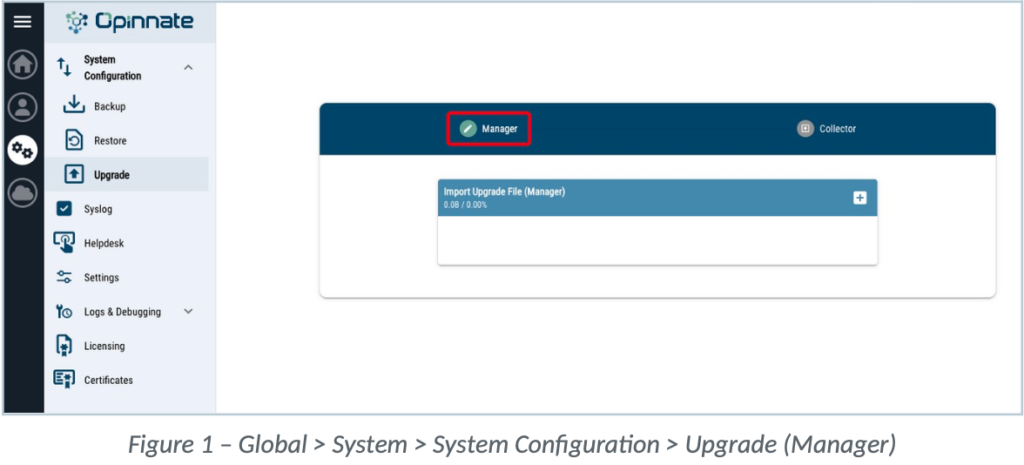
4. Figure 1 – Global > System > System Configuration > Upgrade (Manager)
5. Notes: The upgrade must be performed in two stages, in order: first upload and upgrade the “opinnate-updater.zip” file, then repeat the same steps to upload and upgrade the “opinnate-v5.2.1” file.
6. Select the upgrade zip file and click upgrade.
7. Then cloud/upload icon will appear on right/up corner and click on it.
8. The system will log you out after each upgrade process.
9. While upgrading, services will restart. Services can be controlled with “watch docker ps” from cli.
3. Collector
1. Upgrade files for Opinnate Collector v4.1.2 will be provided.
2. Connect Opinnate Web UI via browser with HTTPS protocol.
3. There is “System Configuration > Upgrade” menu in “System” on left menu bar.
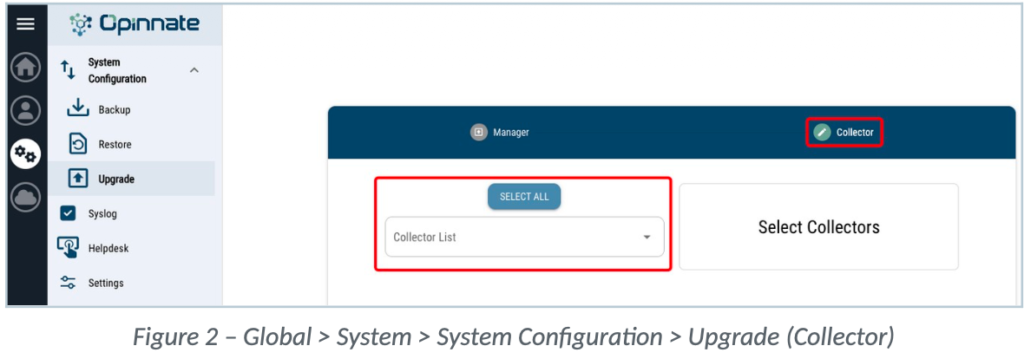
4. Figure 2 – Global > System > System Configuration > Upgrade (Collector)
5. Select the collector which one or all planned to upgrade.
| Opinnate Network Security Policy Manager 5.2 Release Notes | ||
| Doc #39 | Version: 01 | Page 6 / 8 |
6. Select the upgrade zip file and click upgrade.
7. Then cloud/upload icon will appear on right/up corner and click on it.
While upgrading, services will restart. Services can be controlled with “watch docker ps” from cli.
4. Steps Required After Upgrade
1. Check the remote authentication.
2. Provide Coupon Code for trial usage on Add-Ons (Opinnate Support). 3. Trigger manually Renew Data process.
4. Check the ssl connection from client to Opinnate Manager with the updated Server Certificate.
5. Check the Alert Composer Alerts if any of them could be triggered.
6. Check the SMTP Server connection with sending a test mail.
7. Check the connectivity between Manager and Collector(s).
8. Check the Monitor page in Global > System > System Configuration for Manager and Collector resource data.
9. Check the Risk Score values calculated for the rules after the Renew Data process. 10. Re-create the filters on the Virtual Area Dashboard.
11. Check the Log Storage value for the Collector(s) in Global > System > Settings. 12. Check the Alerts under Alert & Notification Settings for existence and newly added, then enable Collector alarms if needed.
Updates and Changes
These are the new features added in 5.2.1 version.
Global:
• Monitor page has been added in Global > System > System Configuration: CPU, memory, disk and
• similar resource information can be monitored for Opinnate Manager and all Collectors connected to it. This page can be used instead of connecting to the systems via SSH.
• SAML integration has been added as a login method for Opinnate Manager.
Analysis:
• Risk Score is now calculated with a separate scoring mechanism for each rule. • Risk Score value can be displayed on the Rule Card.
• Vulnerability Findings field has been added to the Rule Card: within the scope of the Vulnerability Tool integration, it shows which server contains vulnerabilities and which rules are affected.
| Opinnate Network Security Policy Manager 5.2 Release Notes | ||
| Doc #39 | Version: 01 | Page 7 / 8 |
• Security Group Profile details can be viewed on the Rule Card for the Palo Alto vendor.
• New Rules Filter Fields are added: Risk Score, Risk Point, Vulnerability Severity, Rule UUID.
• Last Seen: The date the related object was last used is now shown in the Object Usage output that can be examined for each rule.
• IPAM integration details are displayed for address objects with a /32 prefix, both on the Rule Card and on the Addresses page.
• Object Usage has been added in Virtual Area > Home (Analysis) > Usage Analysis: a report can be taken for all rules on a firewall.
• Custom Usage: User option has been added; User information is searched with “Contains” logic.
• External Connector has been added in Virtual Area > Settings > Device Integration: a. IPAM: Efficient IP, Infoblox and NetBox are supported.
b. Vulnerability: Tenable Nessus is supported.
• Device Zones & Sites has been added in Virtual Area > Settings > Device Integration: devices can be grouped in order to use grouping on the Network Topology page. • Network Topology: topology details can optionally be displayed as Device Zones, Sites and Node.
• New Alert has been added in Virtual Area > Settings > Alert & Notification Settings > Alerts:
a. Firewall HA Role Change: Triggered when the HA role of a firewall changes. • Alert Composer: Syslog forwarding has been added as an action for Real Time Alerts. • Alert Composer: Severity and Subject customization options have been added for Real Time Alerts.
• Juniper SRX Firewall is supported.
Reporting
• New regulation templates have been added in Virtual Area > Compliance & Reporting > New Report:DORA, NIS2 and SAMA CSF.
• Multiple filters can be selected for the “Custom Filtered Rules” subject in New Report.
• Custom report template creation option has been added in Virtual Area > Compliance & Reporting > Report Settings.
Optimization
• Enable Rule Logging has been added in Virtual Area > Optimization: logging can be enabled through the optimization module for the rules whose logging is disabled.
| Opinnate Network Security Policy Manager 5.2 Release Notes | ||
| Doc #39 | Version: 01 | Page 8 / 8 |
Automation
• Address & Address Group Create flows can be performed in bulk with Excel. • “Add New Rule (Connected)” option has been added in Virtual Area > Automation. • Rollback option has been added for Add New Rule and Disable Rule flows.
Add-ons:
Switch Hardening:
• Hardening analysis is supported for Cisco, Arista, Juniper and Huawei switches.
Improvements:
• The embedded Server Certificate has been replaced and updated.
• Risk Score structure has been changed.
• Network Topology page design has been changed.
• Alert Composer: mail design has been updated for alarm notifications. • The filter mechanism on the Rules page has been changed from admin-based to shared.
Support
If you encounter any issues while using Opinnate NSPM, please contact our support team at [email protected].
Thank you for choosing Opinnate! We hope you enjoy using it.


